
Artificial Intelligence has evolved from simple chat-based assistants to powerful systems capable of writing code, analyzing data and automating workflows. However, most AI tools still operate inside restricted environments with limited access to system resources. Open Interpreter changes this paradigm by allowing Large Language Models (LLMs) to run code directly on your local machine through natural language commands.
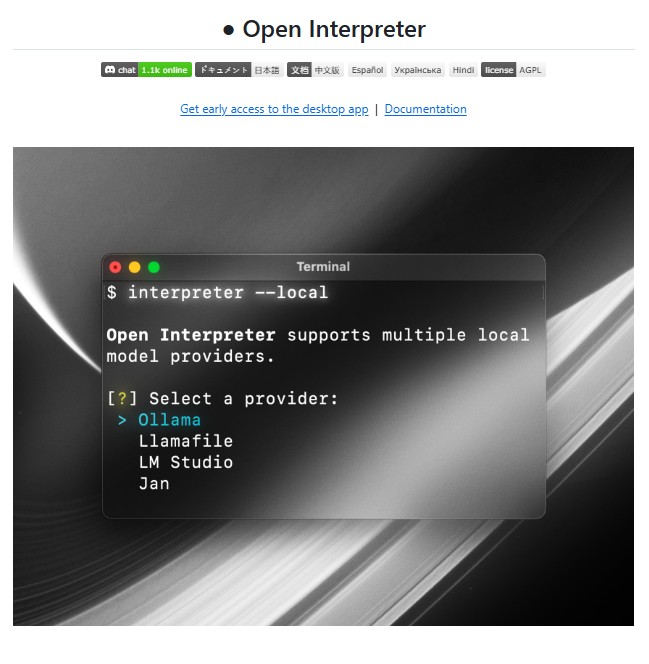
Open Interpreter is an open-source project that provides a ChatGPT-like interface in the terminal, enabling users to interact with their computer using plain English. Whether it is running Python scripts, automating browser tasks, editing files, or analyzing datasets, Open Interpreter bridges the gap between AI reasoning and real-world execution.
What Is Open Interpreter?
Open Interpreter is a local execution framework that allows language models to run code such as Python, JavaScript, and shell commands directly on your system. Unlike hosted AI tools, Open Interpreter operates within your own environment, giving it access to your files, installed libraries, internet connection, and system resources.
After installation, users can simply run the interpreter command in the terminal and start chatting with the AI. Each command is interpreted, translated into executable code, and run locally after user confirmation.
This approach effectively turns Open Interpreter into a natural language interface for computers, making advanced computing tasks accessible even to non-programmers.
How Open Interpreter Works
At its core, Open Interpreter equips a function-calling language model with the ability to execute code using an internal exec() function. The process works as follows:
- The user provides a natural language instruction.
- The language model determines the required steps and generates executable code.
- The code is displayed and awaits user approval.
- Once approved, the code runs locally.
- Outputs, logs, and results are streamed back to the terminal in real time.
This transparent execution model ensures safety while preserving flexibility and power.
Key Features
1. Local Code Execution
Open Interpreter runs code on your machine rather than a remote server. This removes common limitations such as file size restrictions, execution timeouts, and package constraints.
2. Multi-Language Support
It supports Python, JavaScript, shell commands, and more, allowing it to handle a wide range of tasks from scripting to automation.
3. Interactive Terminal Interface
Users interact with Open Interpreter through a conversational interface directly in the terminal, making it intuitive and efficient.
4. Internet and System Access
Unlike hosted environments, Open Interpreter can access the internet, local files, and system settings, enabling real-world automation.
5. Streaming Responses
The tool streams outputs in real time, providing immediate feedback and better visibility into ongoing processes.
Installation and Setup
Open Interpreter can be installed using pip:
pip install git+https://github.com/OpenInterpreter/open-interpreter.git
Once installed, starting the interpreter is as simple as running:
interpreter
This launches an interactive session where users can issue commands in natural language.
For developers who prefer cloud-based experimentation, Open Interpreter also supports GitHub Code spaces, providing a preconfigured environment without risking the local system.
Using Open Interpreter Programmatically
Open Interpreter can be integrated into Python workflows for more advanced use cases. Example:
from interpreter import interpreter

interpreter.chat("Plot normalized stock prices for AAPL and META")
The interpreter maintains conversation history, allowing context-aware follow-up commands. Developers can reset or restore sessions as needed, enabling long-running workflows.
Running Local Language Models
One of Open Interpreter’s most powerful features is its ability to work with locally hosted language models using OpenAI-compatible APIs such as LM Studio, Ollama, and jan.ai.
Users can connect Open Interpreter to a local inference server:
interpreter --api_base "http://localhost:1234/v1" --api_key "fake_key"
This enables fully offline AI execution, offering improved privacy, reduced latency, and complete control over model behavior.
Comparison with ChatGPT Code Interpreter
While ChatGPT’s Code Interpreter introduced the idea of AI-assisted coding, it comes with notable limitations:
- No internet access
- Limited runtime and file size
- Restricted package availability
- Temporary execution environment
It overcomes these constraints by operating locally. It combines the intelligence of LLMs with the unrestricted power of the user’s own system, making it suitable for real-world applications.
Use Cases
Open Interpreter can be applied across multiple domains, including:
- Data analysis and visualization
- File management and automation
- Browser-based research and scraping
- Media editing such as images, PDFs, and videos
- Software development and scripting
- AI-assisted system administration
Its versatility makes it useful for developers, analysts, researchers and even beginners exploring programming concepts.
Safety and Responsible Usage
Since Open Interpreter executes code locally, safety is a critical consideration. The tool requires user approval before running any command, reducing the risk of unintended system changes.
For advanced users, auto-run mode can be enabled, but it is recommended to use this feature cautiously. Running Open Interpreter inside isolated environments such as Docker, Google Colab or virtual machines further enhances safety.
Conclusion
It represents a major step forward in human-computer interaction. By allowing users to control their computers using natural language, it removes technical barriers and unlocks new possibilities for automation, productivity, and creativity.
Its ability to run code locally, integrate with both hosted and offline language models, and operate without artificial restrictions makes it one of the most powerful AI tools available today. As AI continues to move toward agentic and autonomous systems, Open Interpreter stands out as a practical, flexible, and future-ready solution.
For anyone seeking deeper integration between AI reasoning and real-world execution, Open Interpreter is a tool worth exploring.
Follow us for cutting-edge updates in AI & explore the world of LLMs, deep learning, NLP and AI agents with us.
Related Reads
- GPT-Engineer: A Powerful Foundational Tool in AI-Driven Software Development
- LlamaIndex: The Leading Data Framework for Building LLM Applications
- Qwen3-VL-Embedding and Qwen3-VL-Reranker: A New Standard for Multimodal Retrieval
- Flowise: A Visual Platform for Building AI Agents and LLM Workflows
- Adala: An Autonomous Data Labeling Agent Framework for Intelligent AI Systems
3 thoughts on “Open Interpreter: Bringing Natural Language Control to Your Local Computer”